Securing AI Agents with HashiCorp Vault: A Step-by-Step Implementation Guide
Introduction
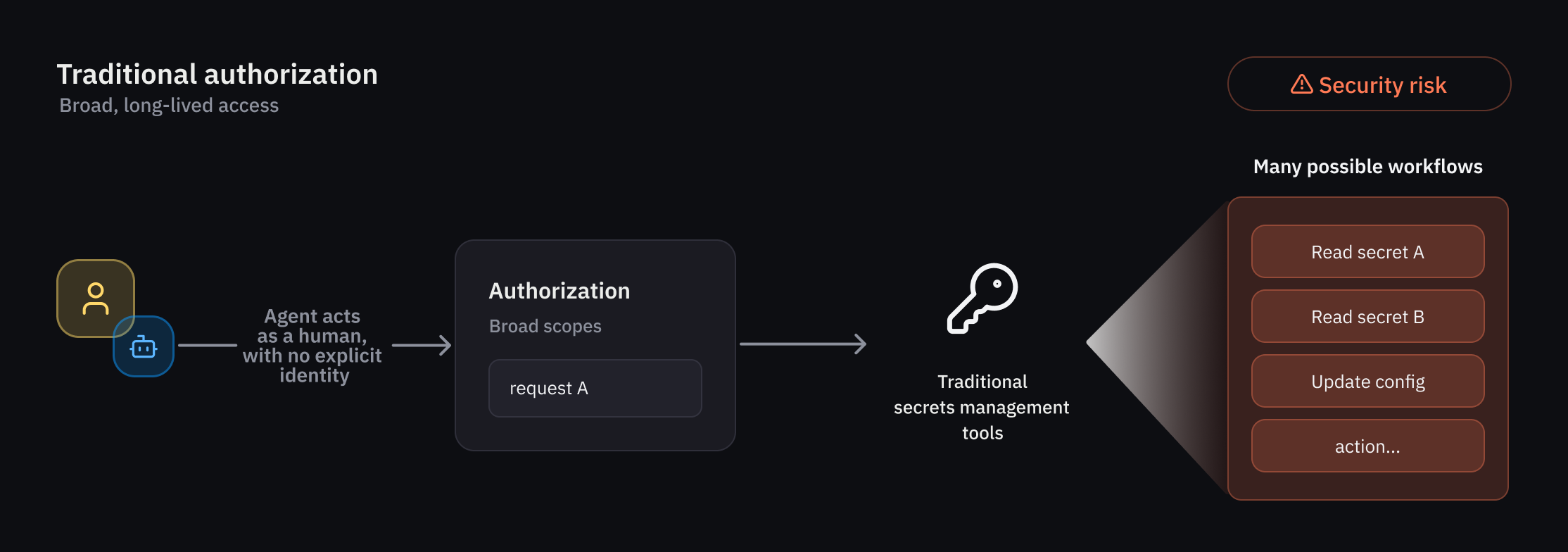
As organizations deploy AI agents that operate autonomously and non-deterministically, traditional IAM falls short. HashiCorp Vault now offers native support for agentic identities, delegation, and ephemeral authorization. This guide walks you through setting up Vault to secure AI agents with fine-grained, runtime policies and temporary access rights. By following these steps, you'll establish a robust framework for agent registration, identity-based policies, per-request authorization, and observability.
What You Need
- A running HashiCorp Vault instance (version with early access or public beta for AI agent capabilities).
- Administrative access to Vault (root token or sufficient policy privileges).
- AI agent service accounts or application credentials for registration.
- Basic understanding of Vault policies and authentication methods.
- Optional: Audit device enabled for logging agent actions.
Step-by-Step Guide
Step 1: Register Your AI Agents in the Agent Registry
The agent registry is a new primitive in Vault that separates agent identities from human and traditional non-human identities (NHIs). This dedicated tracking is essential for delegation flows, especially when an agent uses an on-behalf-of (OBO) pattern. To register an agent:
- Authenticate to Vault with an admin token.
- Use the Vault CLI or API to create an agent identity entry. For example:
vault write agent-registry/agents/my-ai-agent type="autonomous" metadata="purpose=code-review,owner=team-alpha" - Optionally associate the agent with a delegate human user for OBO scenarios:
vault write agent-registry/agents/my-ai-agent/delegate user="alice" - Verify registration with
vault list agent-registry/agents.
This registry forms the foundation for all subsequent authorization and credential management steps.
Step 2: Define Granular Identity-Based Policies for Agents
Create policies that enforce least privilege by scoping permissions to specific agent actions and resource paths. Since agent behavior is non-deterministic, use deterministic guardrails combined with per-request evaluations.
- Write a policy file (e.g.,
agent-code-review.hcl):path "secret/data/code-repos/*" { capabilities = ["read", "list"] allowed_parameters = { "repo" = ["frontend", "backend"] } } path "auth/token/lookup-self" { capabilities = ["read"] } - Attach the policy to the agent identity created in Step 1:
vault policy write agent-code-review ./agent-code-review.hclvault write agent-registry/agents/my-ai-agent/policy policy="agent-code-review" - For delegation mode, also grant the delegate user a policy that allows consent actions.
Step 3: Configure Per-Request (Ephemeral) Authorization
Reduce risk by granting temporary access rights that expire after each specific task or time window. This is crucial for autonomous agents that may execute unpredictable sequences.
- Enable ephemeral authorization on the agent’s identity:
vault write agent-registry/agents/my-ai-agent/ephemeral enabled=true max_ttl="10m" - When the agent makes a request, Vault evaluates the current action against the policy and issues a temporary token or credential. The agent must handle token refresh as needed.
- Test by having the agent request a secret and verify the token expires after the configured TTL.
Step 4: Implement On-Behalf-Of (OBO) Delegation with Consent
When an AI agent acts on behalf of a human user, explicit delegation and consent must be tracked. This ensures clear attribution and auditability.
- In the agent registry, link the agent to a delegate user (done in Step 1).
- Configure the delegate user to consent to specific scopes. For example:
vault write agent-registry/delegations/delegation-1 agent="my-ai-agent" delegate_user="alice" scopes="code-read,log-view" - When the agent uses the OBO pattern, Vault verifies the consent and enforces the union of the agent’s policy and the delegate’s policy, respecting the most restrictive combination.
Step 5: Monitor and Audit Agent Activity
Establish observability over agent actions to detect anomalies and maintain compliance.
- Enable audit logging in Vault:
vault audit enable file file_path=/var/log/vault/audit.log - Review logs for agent-specific entries, filtering by the agent identity field.
- Integrate with SIEM tools to alert on unusual patterns, such as repeated authorization failures or access to sensitive paths.
- Periodically rotate credentials used by agents using Vault’s dynamic secret engines.
Tips for Success
- Start with minimal permissions - always adhere to least privilege. Gradually expand as you understand agent behavior.
- Use short TTLs for ephemeral authorization to limit exposure if an agent is compromised.
- Test delegation flows manually before production to ensure consent scopes are correctly enforced.
- Regularly review audit logs to identify any unauthorized delegation or excessive access.
- Combine with Vault’s dynamic secrets (e.g., database credentials) to further reduce static credential use.
- For early adopters, keep an eye on agent registry updates as the feature matures from beta to GA.
By following this guide, you can securely integrate AI agents into your infrastructure, leveraging Vault’s native support for agentic identities, ephemeral authorization, and granular policies. This ensures both operational flexibility and robust security.
Related Articles
- Mastering GitHub Copilot CLI: Interactive vs Non-Interactive Modes Explained
- Apple's High-Octane Week: F1 Miami, Record Earnings, and Ted Lasso's Return
- ASML CEO Declares Unassailable Lead in Chip Lithography: 'No One Is Coming for Us'
- How to Harness AI Across Your Software Development Lifecycle
- Reddit's Mobile Web Block: Understanding the App-Only Push
- Supercharge Your Python Development with Codex CLI: A Step-by-Step Guide
- Mastering the Kentucky Derby Experience: A Complete Viewer's Guide
- The Ultimate Guide to Pre-Ordering the Commodore 64C Ultimate Edition: Bringing Back Retro Elegance