Google's Gemini AI Gets a Major Overhaul: Say Goodbye to Endless Text Chats
For the past few years, interacting with generative AI has largely meant typing a prompt and reading a wall of text in response. Google is now turning that model on its head with a radical redesign of its Gemini AI assistant, unveiled at the company's annual I/O developer conference.
The End of the Chat Log Era
Gone is the familiar but often frustrating back-and-forth of question-and-answer logs. Instead, Gemini will now respond with a dynamic mix of rich visuals, interactive elements, and magazine-like layouts, tailoring its output to the context of the query. "It stops feeling like you're scrolling through this endless chat log," says Jenny Blackburn, Gemini's UI/UX lead, "and more like the interface is organically adapting around the information that's being generated."
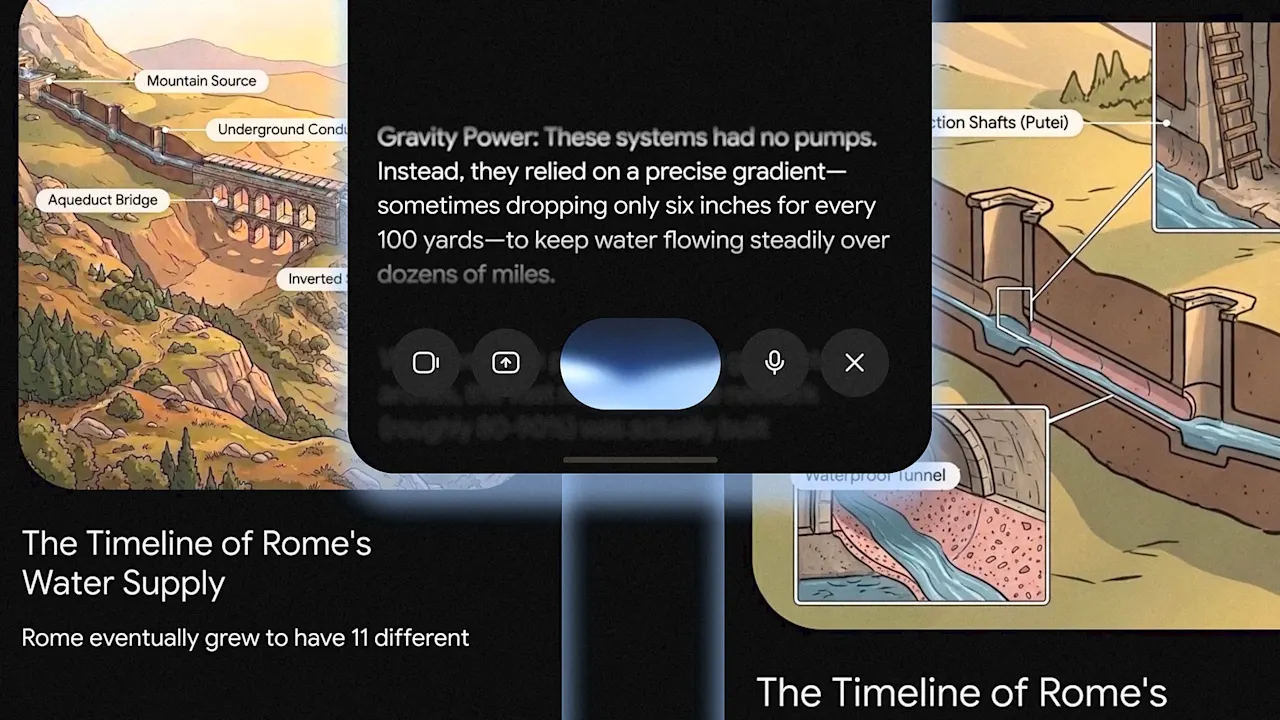
This shift marks a decisive break from the prompt-and-response interface that has defined the first wave of widely available generative AI. With an estimated 900 million monthly users, Gemini is one of the most prominent ways people experience AI firsthand—and until now, those interactions have been constrained by the limitations of pure text conversation.
A More Adaptive AI Experience
The new Gemini app and desktop experience are built around adaptability. Instead of users having to learn complex commands or repeatedly rephrase questions to get useful answers, the AI now assesses each request and chooses the most appropriate display format. A factual query might return a concise card with key points; a creative request could generate an infographic or an interactive widget.
“We think that as this technology becomes more capable, the interface should actually get simpler,” Blackburn explains. “Instead of you as a user having to learn and adapt to the software, which has been how software has been forever, we really see a future where the software adapts to the user and takes into account their specific needs.”
This philosophy extends beyond visual output. The redesign also refines how users provide input, making it easier to switch between typing, voice, and uploading documents or images.
Multimodal Input Made Easier
User feedback played a central role in the redesign. A frequent request was for smoother transitions between input modes. “Multimodality matters a lot,” says Blackburn. “We see, particularly on phones, people use their camera a lot to give context to Gemini. They also really like to switch between voice and typing. And they were telling us you need to make this easier.”
To address this, the updated Gemini streamlines the typing interface: during written prompting, only the text box and keyboard are displayed, reducing visual clutter. A separate menu with a simple grid of icons lets users instantly choose other input methods—whether speaking, snapping a photo, or attaching a file. The result is a cleaner, more intuitive experience that puts the user's natural expression first.
Designing for Simplicity and Adaptability
Blackburn and her team drew on extensive user data to guide their interventions. The goal was to break down the “giant wall of text” that has characterized AI chatbots and replace it with an interface that feels more like a collaborative partner. Key design principles included:
- Contextual relevance: The AI chooses the response format that best fits the query, whether that's a bulleted list, a rich graphic, or an interactive chart.
- Reduced cognitive load: By hiding unnecessary interface elements during typing, users can focus on their prompt without distractions.
- Seamless modality switching: One-tap access to voice, image, and file uploads makes it easy to provide rich context.
This adaptability extends to the way information is presented on the page. Instead of a linear chat log, responses now flow like a curated magazine article, with headings, images, and interactive components arranged to guide the user's eye. The interface adapts to the information rather than forcing information into a rigid chat format.
Looking Ahead: The Future of AI Interaction
Google's overhaul of Gemini signals a broader industry trend: moving away from text-only interfaces toward multi-modal, adaptive experiences. As AI becomes more capable, the complexity should shift from the user to the software. “We see a future where the software adapts to the user,” Blackburn emphasizes.
The redesign is already rolling out to Gemini users across mobile and desktop. Early reactions suggest that the shift from “endless chat logs” to a more visual, context-aware interface is resonating with those who found earlier AI assistants clumsy or overwhelming. If successful, this approach could set a new standard for how we interact with AI—one where the technology fades into the background and the conversation feels natural, intuitive, and efficient.
Google's bet is that by making Gemini simpler to use, people will engage with it more deeply and in more creative ways. For the 900 million users already on board, the end of the giant wall of text may be just the beginning of a much more interesting conversation.
Related Articles
- 6 Essential Insights for Scaling Interaction Discovery in LLMs
- What You Need to Know About Live updates from Elon Musk and Sam Altman’s co...
- Uncovering Critical Interactions in Large Language Models at Scale
- Mastering Agentic AI in Xcode 26.3: A Step-by-Step Guide
- AWS Unleashes AI Agents: Amazon Quick Desktop App and Connect's Four New Solutions in Focus
- Marinus Link's Victorian Odyssey: 90 Landholders, Three Mobs, Two Transformers, and 90km of Cable
- Breaking Free from Vendor Lock-In: Unified Agentic Memory Across AI Coding Assistants with Hooks and Neo4j
- Experts: Eval Engineering Emerges as Critical Missing Link in AI Agent Governance